AL development
Equipment Rental Management for Microsoft Dynamics 365 Business Central: Contracts, Availability, Deposits and Return Billing
A Business Central extension that runs the full lifecycle of renting out equipment, from contract to pick-up to return to billing. It prevents double-booking, supports weekly and daily pricing, and offers two payment modes (deposit or full upfront). It automatically calculates late fees and damage charges, then creates the standard sales invoices and credit memos. Revenue analytics by equipment, category and month are included.
Watch Solution Demo Video Project Documentation
- Platform: AL extension for Microsoft Dynamics 365 Business Central
Overview
The extension adds a rental contract document that moves through clear stages:
Open: the contract is drafted with a customer, rental period and equipment lines.
Released: validated and availability-checked, ready to hand over.
Picked Up: equipment is out, and the pick-up invoice is created if money is due at handover.
Posted: on return, a permanent posted contract is created along with the final invoice, an optional deposit credit memo and revenue entries.
Supporting features include an equipment register (fleet quantity, daily and weekly rates, deposit per unit, status), an availability worksheet, a rental analytics page, a rental setup page, and optional inventory movement between a yard location and a rented location.
Business problem
Equipment rental businesses (construction tools, event gear, machinery) often run on spreadsheets and handwritten forms alongside their accounting system. That creates several problems:
Double-booking: without a single view of reservations, the same equipment is promised twice.
Billing errors and leakage: weekly rates, partial weeks, late days and damage charges are calculated by hand and often missed or disputed.
Deposit handling: deposits must be collected, applied against the final bill and any remainder refunded, which is easy to get wrong.
Weak visibility: it’s hard to know what’s currently out, what’s overdue and which equipment actually earns money.
Disconnected stock: physical movement of rented items isn’t reflected in inventory.
Solution and architecture
Design: a document-driven extension that reuses Business Central’s own sales and inventory engines, so rental billing and stock follow normal accounting rules.
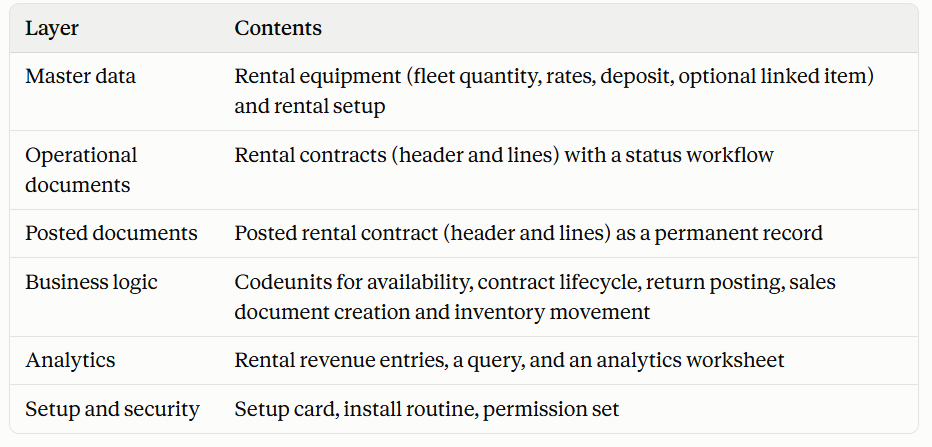
Key design decisions:
Documents-to-posted-documents pattern. Open contracts are working documents. Returning the equipment creates an immutable posted contract and removes the open one, which matches standard BC practice.
Reuse of standard Sales. The extension doesn’t invent its own billing. It creates regular sales invoices and credit memos, which keeps VAT, receivables, customer ledger and reporting intact. Auto-posting can be switched on.
Two payment modes. Deposit + pay at return invoices only the deposit at pick-up and the rental at return. Pay in full upfront invoices the full rental at pick-up and only extra charges at return.
Availability by date, not just by count. Reservations are evaluated day by day across the contract period against fleet quantity, including overdue equipment that is still out.
Configurable commercial rules. Accounts for revenue, late fees, damage and deposits, plus the late-fee multiplier, maximum rental period and default payment mode, are all in setup.
Revenue analytics as its own ledger. Each returned line produces a revenue entry for fast reporting without recomputing from posted documents.
Technical implementation
Contract lifecycle. Releasing a contract checks the customer isn’t blocked, that dates and lines are complete, and that the period doesn’t exceed the configured maximum. It then verifies availability and recalculates line amounts before changing the status. Pick-up re-checks availability, creates the pick-up invoice if something is due, optionally moves stock, and sets the return date to the planned end date. Contracts can be reopened from Released but not once equipment is out.
Availability engine. For each equipment item on the contract, the system walks every day in the rental period and compares fleet quantity with what other released or picked-up contracts have reserved that day. Picked-up lines that are past their end date and not yet returned continue to block equipment up to the current work date, so overdue rentals don’t allow the same unit to be re-promised. The same logic powers the availability worksheet and the quick actions on the equipment and contract pages.
Pricing. Lines pull daily and weekly rates and the deposit per unit from the equipment record. Weekly pricing charges full weeks at the weekly rate and remaining days at the daily rate, never exceeding the cost of an extra week. In upfront mode, the line deposit is zero, and switching modes recalculates all lines while preserving the deposit values so they return if the mode is switched back.
Return posting. This is the core transaction, run as one flow:
It validates that all quantities are returned, that damaged items carry a description, and that the required accounts are configured.
It calculates late days from the planned end date and a late charge per line using the daily rate and the configured multiplier, and adds damage charges.
It builds the posted contract with all amounts.
It creates the return invoice. In deposit mode this has rental, late-fee and damage lines minus the applied deposit; in upfront mode it contains only late and damage charges, since rental was billed at pick-up. If nothing is left to bill, no invoice is created.
If part of the deposit is unused, it creates a credit memo for the refund.
It writes revenue entries, moves stock back to the yard, removes the open contract, and optionally auto-posts the invoice in its own transaction so a posting failure doesn’t undo the return.
Inventory integration. If enabled, equipment linked to an item is transferred between a yard location and a rented location through item reclassification at pick-up and return, so stock reflects where the equipment physically is.
Analytics. A query summarizes units and revenue by equipment and category. The analytics worksheet groups results by equipment, category or month, with drill-down into the underlying entries. FlowFields on the equipment card show quantity currently out and lifetime revenue.
Setup, date control and security. A setup card holds accounts, rules and a helper to create the contract number series. A configurable date filter can restrict the months in which transactions are allowed, to match restricted trial or development licenses. The code works from the work date and never from today’s date. One permission set covers the module’s tables and codeunits.