AL development
Fleet & Vehicle Management Solution for Microsoft Dynamics 365 Business Central: Vehicles, Drivers, Maintenance and Cost Posting to the General Ledger
A Business Central extension that manages a company’s vehicles, drivers, fuel and maintenance in one place. It tracks assignments, fuel cards, documents and preventive-maintenance schedules, and it posts fuel and service costs straight to the general ledger with a dedicated vehicle dimension. Management can see the true cost of each vehicle, and service due dates are flagged before they become overdue.
Watch Solution Demo Video Project Documentation
- Platform: AL extension for Microsoft Dynamics 365 Business Central
- BC components used: General Journal posting (Gen. Jnl.-Post Line) | Dimensions and Dimension Sets |G/L Entries | No. Series | Vendors | Bank and G/L Accounts
Overview
The extension covers the full lifecycle of a company vehicle:
Master data: vehicles (make, model, fuel type, odometer, status), drivers (license number, class and expiry), fuel cards, and vehicle documents such as insurance, registration and permits.
Assignments: a driver is handed a vehicle and later returns it, with odometer readings recorded at both ends.
Fuel: fuel transactions are captured and then posted. Consumption in L/100 km is calculated automatically.
Maintenance: service types, per-vehicle maintenance schedules with status (OK, Due Soon, Overdue), and service orders with lines for labor, parts and other costs.
Cost reporting: a Fleet Ledger Entry for every posted cost, linked to the G/L entry and its dimensions, with totals visible on the vehicle card.
Business problem
Companies with field teams, delivery vans or admin cars usually manage fleets in spreadsheets, apart from the accounting system. That causes recurring problems:
Hidden costs: fuel and repair costs land in general expense accounts, so nobody knows what a specific vehicle really costs.
Missed maintenance: services are scheduled by memory or by paper, which leads to breakdowns, voided warranties and unsafe vehicles.
Unclear accountability: it’s hard to say who had which vehicle at a given time, or whether the driver’s license was valid when the vehicle was issued.
Expiring documents and cards: insurance, permits and fuel cards lapse unnoticed.
Double entry and errors: transactions are typed into accounting by hand from fuel receipts and workshop invoices.
Solution and architecture
Design: an extension that sits on top of Business Central’s financial core, so every fleet cost becomes a real accounting transaction and not a side record.
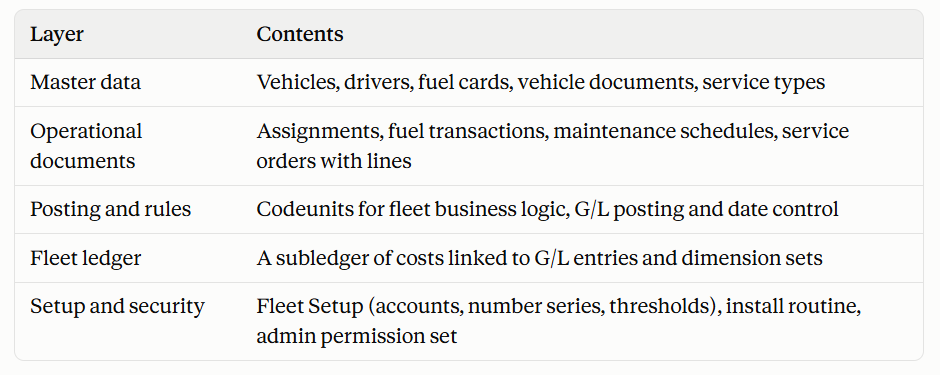
Key design decisions:
Costs post through standard BC posting. Fuel and service amounts go through the normal general journal engine, so they appear in the G/L, respect dimensions, and can be audited like any other transaction.
Vehicle dimension. Each vehicle is created as a value of a dedicated dimension, and the vehicle’s global dimensions (such as department) are carried onto every posting. This allows cost analysis per vehicle, department or project using BC’s standard reports.
Fleet subledger. A Fleet Ledger Entry sits next to each G/L entry and stores the vehicle, driver, cost type, quantity, odometer and source document, so fleet-specific analysis doesn’t require reading raw G/L data.
State-driven documents. Service orders move through Open → In Progress → Completed → Posted (or Cancelled). Assignments move from Active to Returned. Each step has validations, and vehicle status follows automatically (for example, In Maintenance during a service).
Rules are enforced centrally, not left to the user.
Configurable, with sensible defaults. An install routine creates number series, setup values and standard service types (oil, tires, brakes, inspection, general repair), and a demo-data action produces sample records.
Technical implementation
Assignments and vehicle state. Assigning a vehicle checks that it is active and not blocked, the driver isn’t blocked, the license is still valid at the start date, and neither the vehicle nor the driver already has an active assignment. The start odometer defaults to the vehicle’s current reading. Returning a vehicle requires an end date and an end odometer that is not lower than the start, then clears the current driver and vehicle links and updates the vehicle’s odometer.
Service order workflow. Starting an order puts the vehicle into the In Maintenance status. Completing, cancelling or reopening an order keeps this in sync. The vehicle only returns to Active when no other order is still in progress. Orders can also be generated directly from a maintenance schedule line. After posting, the schedule’s last service date and odometer are refreshed so the next due point recalculates.
Preventive maintenance. Each schedule line combines a distance interval and a time interval, taken from the service type but overridable per vehicle. The system computes the next due date and odometer, and assigns a status of OK, Due Soon or Overdue based on configurable warning thresholds in days and kilometres. A refresh action recalculates every schedule on demand.
Cost posting. Posting a service order or a fuel transaction builds a general journal line, adds the dimension set, and posts it through the standard engine:
The expense account comes from the order line or service type, or from setup as a fallback.
The balancing side is the fuel card’s provider vendor when there is one, or the account configured in setup (G/L, bank or vendor).
Dimensions are merged from the vehicle’s global dimensions and the dedicated vehicle dimension.
The resulting G/L entry number is stored on the fleet ledger entry, so users can jump from fleet cost to accounting entry and back.
Fuel validation and analytics. Fuel posting verifies the card is active and unexpired, that the odometer isn’t lower than the vehicle’s current reading, and that an amount is present. It then calculates distance since the last fill and fuel consumption in L/100 km.
Reporting through FlowFields. The vehicle card shows live totals (fuel cost, maintenance cost and total cost) and the earliest expiring document, calculated on demand from the fleet ledger and the document table, without duplicated data.
Date control for restricted environments. A central date guard can limit transactions to a configured set of months, which mirrors the date restrictions of trial or development licenses. Defaults use the work date moved into the allowed window, and maintenance due dates move backward into the window so a service is never delayed.
Setup, security and onboarding. On installation the extension creates number series, setup defaults and standard service types. A single admin permission set covers all tables and objects, and a setup-page action creates a sample fleet for demos and training.